July 14, 2025

You’ve probably heard the idea that to quickly get decent focus in a landscape photo, focus one third of the way into the scene.

But there’s a problem with that which can leave your foreground soft.

And it’s easy to miss until you get back home and zoom in on your images in Photoshop, when it becomes painfully clear.

The problem is that focusing one third of the way into the scene, you might still be focusing on something that’s too far away for the depth of field to fully cover the foreground.

Let’s say the furthest thing in your scene is a mile away…

Focusing one third of the way into that scene would mean focusing on something a third of a mile away…

And if you have anything remotely close to the camera, chances are that’s gonna fall outside of the depth of field.

So here’s what I do, and what I encourage you to try:

It’s a simple shift, but makes a big difference.

Instead of focusing one third into a landscape scene…

Focus one third into the foreground.

Bringing the focus point that much further forward brings those closer objects more into focus, and the far-point of the depth of field is probably still “infinity”.

Especially when shooting wide angle.

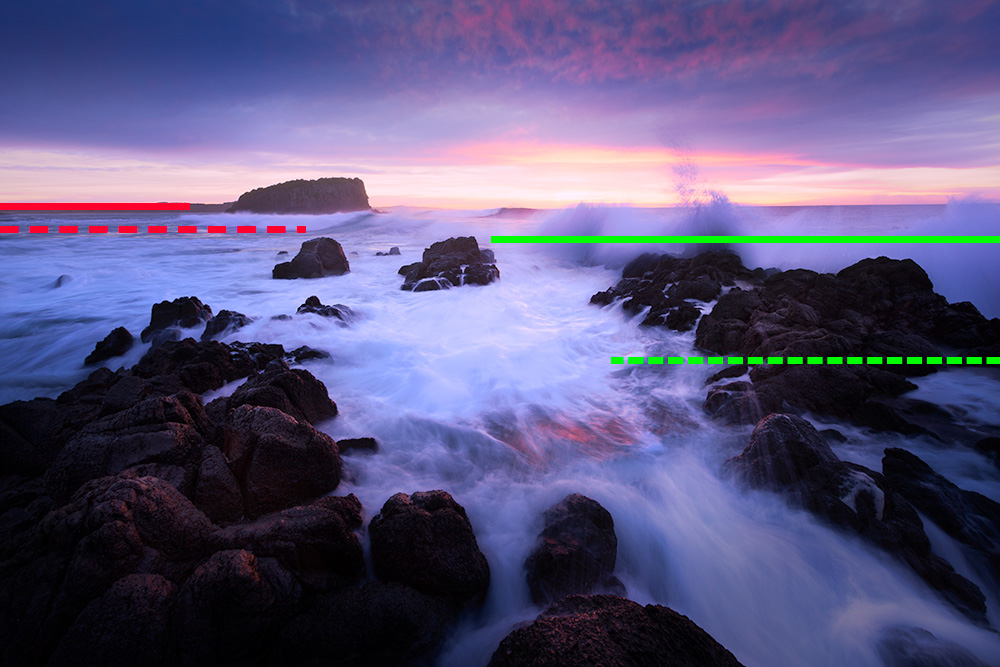
See this image below:

Red Line – Background of the scene

Red Dotted Line – One third “into” the scene

Green Line – Where the foreground ends

Green Dotted Line – One third into the foreground

Thing is, this is what I consider an “80/20” technique…

Something that will work most of the time for the least amount of effort.

But what about those times when you’re not shooting wide angle, or you’re not shooting a “typical” foreground/background composition?

That’s when you’ll want to dig a little deeper and go beyond the 80/20.

You can learn all about this in my Landscape Capture Masterclass.

Read More

March 3, 2021

**_ Timestamps to key lessons in description below _**

Download the PDF version of this tutorial here: https://postprocessingmastery.com/intro-to-curves

This Curves Photoshop tutorial is for beginners who are looking to get to grips with using Curves in their Photoshop workflow.

You’ll learn:

2:44 – HOW TO ADD A CURVES ADJUSTMENT LAYER TO YOUR IMAGE
4:58 – FUNDAMENTAL CURVES CONCEPTS
8:02 – CREATING AN S-CURVE TO INCREASE IMAGE CONTRAST
11:57 – ALTERING THE BLACK AND WHITE POINTS OF THE CURVE
15:40 – ADJUSTING, ALTERING AND RESETTING A CURVES ADJUSTMENT LAYER
17:30 – AUTO CURVES
21:06 – ADJUSTING THE CURVE IN INDIVIDUAL COLOUR CHANNELS
23:01 – EYEDROPPERS
27:20 – USEFUL CURVES ADJUSTMENT EXAMPLES

Download the PDF version of this tutorial here: https://postprocessingmastery.com/intro-to-curves

Video originally hosted at: https://youtu.be/X0DG6WxCeS8

Read More

March 1, 2021

https://www.youtube.com/watch?v=t90Jmsmos0Y

In this video you’re going to learn how the Fake Grad Filter technique works using my Luminosity Masking Panel.

– Download the Luminosity Masking Panel *
https://postprocessingmastery.com/luminosity-panel

The Fake Grad Filter technique is something that essentially eliminates the need for using grad filters in front of your lens. It works by taking two bracketed exposures instead, and then running through the process I’m about to show you.

– Subscribe To My Channel *
https://postprocessingmastery.com/subscribeyoutube

– Download my FREE PDF Guide *
An Introduction to Luminosity Masking: https://postprocessingmastery.com/intro-to-lm

– More Photoshop Courses *
https://postprocessingmastery.com/go

– Get 1-on-1 Photography Coaching *
https://postprocessingmastery.com/coaching

– Download the FREE 6 Stage Workflow Cheat Sheet *
https://postprocessingmastery.com/workflowcheatsheet

#luminositymaskingpanel #postprocessingmastery

Originally Published here: https://youtu.be/t90Jmsmos0Y

Read More

February 27, 2021

Exposure blending with luminosity masks – Learn how to blend 3 bracketed exposures in Photoshop using my Luminosity Masking Panel.

– Download the Luminosity Masking Panel *
https://postprocessingmastery.com/luminosity-panel

This full landscape editing walkthrough shows my end to end process for creating a natural-looking HDR image using the photoshop actions panel that I personally designed and coded.

If you want to take the otherwise complicated process of exposure blending with luminosity masks and see how quick and easy it can be, then watch all the way to the end of this video because you’ll see how the panel makes your entire workflow easier than ever.

If you don’t have the panel, then you’ll also get a lot out of this walkthrough because you can still do these luminosity masking processes manually, building masks and selections from scratch like how I teach in a number of other videos and courses.

#postprocessingmastery #luminositymaskingtips

Originally Published Here: https://youtu.be/7R1z4c3ZgGY

Read More

February 23, 2021

Learn how to remove halos in photoshop EASILY when exposure blending or replacing a sky with one you have cut out from another image.

– Get My Photoshop Courses *
https://postprocessingmastery.com/go

Sometimes no matter how good a cutout you create or how good your layer mask is when blending exposures, it may be inevitable that you end up with bright halos around your horizons or other objects when exposure blending or replacing a sky with another.

So in this video I’m sharing 2 quick and efficient techniques to remove edge fringe or outlines from cut-outs and masks.

If you like this video let me know and hit the Thumbs Up button, so I can keep making more videos that you’re interested in. And remember to subscribe to my channel and hit the bell notification icon so that YouTube will notify you each time I publish a new video.

– Subscribe To My Channel *
https://postprocessingmastery.com/subscribeyoutube

– Get 1-on-1 Photography Coaching *
https://postprocessingmastery.com/coaching

– Download the FREE 6 Stage Workflow Cheat Sheet *
https://postprocessingmastery.com/workflowcheatsheet

– Download my FREE PDF Guide *
An Introduction to Luminosity Masking: https://postprocessingmastery.com/intro-to-lm

#postprocessingmastery #stevesphotoshoptips

Video originally published here: https://youtu.be/I-sw63W65GA

Read More